Let me ask you something. Do you feel tired every time you think about posting on Facebook, Instagram, LinkedIn, or Twitter? Do you spend hours trying to write one caption? If yes, then you are not alone.
Social media is very important for any business or personal brand. But posting every day is hard. It takes time, energy, and creativity. Many people give up because it feels like too much work.
But what if I tell you that you can post great content every day without working for hours? Yes, it is possible now. Artificial Intelligence (AI) has changed the game. You can use AI to automate almost everything—from writing posts to scheduling them.
In this article, I will teach you step by step how to use AI to automate your social media posting. I will also share the best tools, tips, and a simple table to help you start today. Let’s begin.
Table of content
Table of Contents
What Does AI-Powered Social Media Automation Mean?
First, let us understand the meaning. AI-powered automation means using smart software to create, schedule, and publish your social media posts automatically.
You do not have to write every post yourself. You do not have to remember to post at the right time. The AI does it for you. It can:
- Write captions in your brand’s voice
- Suggest hashtags
- Create images or videos
- Find the best time to post
- Publish automatically
This saves you hours every week. And the best part? The quality remains high.
Why Should You Use AI for Social Media Posting?
Many people still think manual posting is better. But let me show you the real benefits. After reading this, you will want to start using AI today.
1. Saves Time
You can create a week’s worth of posts in just 30 minutes. AI tools write fast. You just review and approve.
2. Consistency
Posting regularly is the key to growth. AI tools never miss a day. They post on time, every time.
3. Better Engagement
AI can analyze what your audience likes. Then it creates similar content. This means more likes, shares, and comments.
4. Cost Effective
Hiring a social media manager is expensive. AI tools cost very little compared to that. Some are even free.
5. Works 24/7
Even when you sleep, AI can post for you. Your audience in different time zones will see your content.
A Simple Table: Manual Posting vs AI Automated Posting
Let me show you a quick comparison so you understand the difference clearly.
| Feature | Manual Posting | AI Automated Posting |
|---|---|---|
| Time needed per post | 15–30 minutes | 1–2 minutes |
| Consistency | Hard to maintain | 100% consistent |
| Best time posting | Guesswork | AI finds best time |
| Content ideas | You struggle daily | AI gives unlimited ideas |
| Cost | High (if hiring) | Low (monthly tool cost) |
| Mistakes | Common | Very rare |
| Scalability | Difficult | Easy |
As you can see, AI automation wins in every area.
Step-by-Step Process to Automate Your Social Media with AI
Now let me give you the exact steps. Follow these, and you will have a fully automated social media system within days.
Step 1: Choose Your AI Content Writer
The first step is to pick an AI that can write your posts. You do not need to write from scratch anymore.
Popular AI writing tools for social media:
- ChatGPT – Best for captions and ideas. Free and easy.
- Jasper – Good for brands. Many templates.
- Copy.ai – Simple and fast.
- Hootsuite Insights – AI-powered content suggestions.
I personally recommend starting with ChatGPT. It is free and very powerful. Just give it a prompt like:
“Write 5 Instagram captions for a small bakery. Tone should be friendly and fun. Use emojis.”
Within seconds, you will have great captions ready.
Step 2: Use AI to Create Images and Videos
Text alone is not enough today. You need eye-catching visuals. AI can now create stunning images and short videos for you.
Best AI visual tools:
- Canva AI – Generates social media graphics
- Midjourney – Creates unique images from text
- DALL-E 3 – Another great image generator
- Pictory.ai – Turns articles into short videos
For example, you can type: “Create a futuristic coffee shop image with neon lights” and AI will give you a ready-to-post image.
Step 3: Automate Hashtag Research
Hashtags help people find your posts. But finding the right hashtags is hard. AI makes it easy.
Tools for AI hashtag generation:
- RiteTag – Gives hashtag suggestions based on your image or text
- Hashtagify – Finds trending and related hashtags
- ChatGPT – Just ask: “Give me 10 popular hashtags for fitness posts”
The AI will give you hashtags that are not too big (millions of posts) and not too small. This gives you the best chance to be seen.
Step 4: Schedule and Publish Automatically
Now comes the real automation. After you create your posts using AI, you need to schedule them. There are tools that connect all your social media accounts and post for you.
Best AI scheduling tools:
- Buffer – Simple and works with all platforms
- Later – Best for Instagram
- SocialBee – Advanced AI automation
- Sendible – Good for agencies
Here is how it works:
- You create 20–30 posts using AI.
- You upload them to the scheduling tool.
- The AI inside the tool finds the best posting times.
- You click “Schedule.”
- The tool posts automatically every day.
You only need to do this once a week. The rest is automatic.
Step 5: Let AI Analyze and Improve
The final step is improvement. AI not only posts but also learns. It tracks which posts get more likes, shares, and comments. Then it tells you what to do next time.
AI analytics tools:
- Sprout Social – Gives AI-powered insights
- Buffer Analyze – Shows best performing content
- Brand24 – Tracks mentions and sentiment
Every week, check what AI tells you. Then ask your AI writer to create more of that type of content. This creates a perfect cycle.
Best AI Tools for Social Media Automation (With Links)
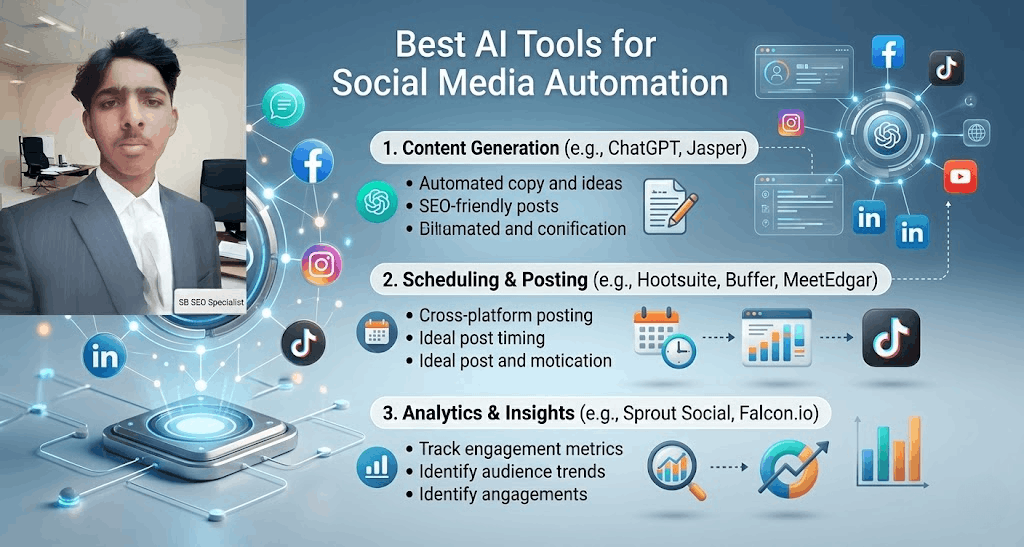
I have personally tested many tools. Here are the ones that work best. Also, I want to share a useful resource with you. If you are a small business owner, you should check out this list of Top 30 AI Tools for Small Business Owners on Spelwise. It covers many more tools beyond social media.
👉 Click here to see Top 30 AI Tools for Small Business Owners
Now, here are my top recommendations specifically for social media automation:
| Tool Name | Best For | Price (Approx) |
|---|---|---|
| ChatGPT | Writing captions and ideas | Free / $20 |
| Canva AI | Creating graphics | Free / $12.99 |
| Buffer | Scheduling posts | Free / $6 per month |
| Later | Instagram automation | Free / $25 |
| Midjourney | Unique images | $10–$30 |
| RiteTag | Hashtag research | $4.99 per month |
Start with the free versions. Then upgrade when you need more features.
Real Example: How I Automated My Own Social Media
Let me share a real example so you understand better. I run a small blog about business tips. Before automation, I used to spend 2 hours every day on social media. I would write posts, find images, and schedule them. It was exhausting.
Then I switched to AI automation. Here is my exact workflow today:
- Monday morning (30 minutes): I open ChatGPT. I ask it to write 20 social media posts for the week. I give it my blog topics. It gives me captions with emojis and questions.
- Monday (15 minutes): I take those captions to Canva AI. It creates matching images automatically.
- Monday (15 minutes): I put everything into Buffer. Buffer’s AI chooses the best times to post. I click schedule.
- Rest of the week: I do nothing. Buffer posts every day at 9 AM and 6 PM.
- Sunday (10 minutes): I check Buffer’s analytics. I see which posts got the most engagement. I note that down for next week.
Total time per week: 70 minutes. Before automation: 14 hours. I saved 13 hours every week. And my engagement went up by 40% because AI chose better posting times.
You can do the same.
Common Mistakes to Avoid When Using AI for Social Media
AI is powerful, but you still need to be careful. Here are mistakes I see many people make. Do not make them.
Mistake 1: Not Editing AI Content
AI is smart but not perfect. Sometimes it writes something wrong or weird. Always read the post before scheduling.
Mistake 2: Using the Same Hashtags Every Time
AI can give you new hashtags. Use them. Do not copy-paste the same 10 hashtags for every post.
Mistake 3: Posting Too Much
More posts do not always mean more engagement. Quality is better than quantity. AI can post 10 times a day, but that might annoy your followers. Start with 1–2 posts per day.
Mistake 4: Ignoring Analytics
AI gives you data. If you do not look at it, you will not improve. Spend 10 minutes a week on analytics.
Mistake 5: Forgetting Your Human Touch
AI can write a caption, but it cannot feel real emotion. Add your own stories and personality. People connect with humans, not robots.
How to Make Your AI Posts Feel 100% Human
This is a very important point. Google and social media algorithms can detect AI content. But that is not the problem. The real problem is that people do not like robotic content.
Here is how to make AI posts feel real and human:
- Add a personal story – Before posting, add one sentence from your real life.
- Use casual language – Tell the AI: “Write like a normal person, not a professor.”
- Ask questions – End your posts with a question to start conversations.
- Use emojis sparingly – Too many emojis look fake. 2–3 are enough.
- Show behind-the-scenes – AI cannot show your real office or team. You add that.
For example, AI might write: “Our product increases productivity by 50%.” You can change it to: “Last week, I used our product and finished work 2 hours early. It felt amazing. Want to try?” See the difference?
Bonus: How to Start a Facebook Shop Affiliate Business Using AI
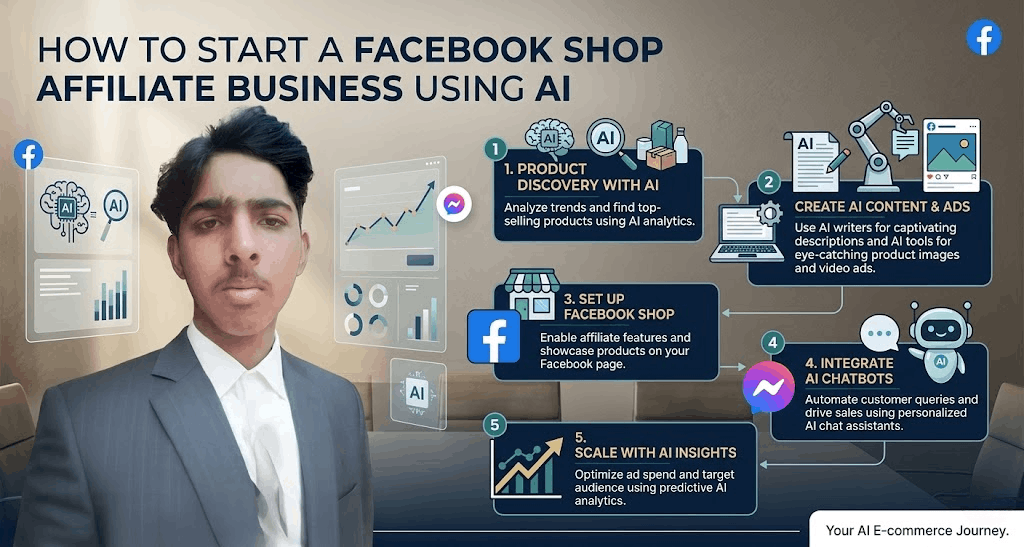
Since you are learning about AI and social media, let me tell you something valuable. You can also use AI to make money through affiliate marketing on Facebook. If you want to learn a complete step-by-step method, I have written another detailed guide.
👉 Click here to read How to Start a Facebook Shop Affiliate Business in 2026
In that guide, I explain how to use AI to find products, write reviews, and automate your Facebook Shop posts. It is a perfect next step after you master AI social media posting.
Frequently Asked Questions (FAQ)
Q1: Is AI content allowed on social media?
Yes, all platforms allow AI-generated content. But you should not spam. Be useful and real.
Q2: Do I need technical skills to use these AI tools?
No. Most AI tools are very simple. If you can type and click, you can use them.
Q3: Can AI reply to comments automatically?
Yes, some tools like ManyChat and MobileMonkey use AI to auto-reply to comments and messages.
Q4: How much does it cost to automate social media with AI?
You can start for free. ChatGPT and Buffer free plan are enough for beginners. Later you may spend $20–$50 per month.
Q5: Will my followers know I use AI?
Not if you edit and add your personal touch. Good AI content looks human.
Final Words: Start Today, Not Tomorrow
I have given you everything you need. You now know:
- What AI automation is
- Why you need it
- Step-by-step process
- Best tools (with a useful table)
- Real example from my life
- Mistakes to avoid
- How to sound human
There is no excuse to waste hours on social media anymore. AI is here to help you. Start small. Pick one tool from this article. Try it for one week. You will be shocked at how much time you save.
Remember, social media is not going away. It is only growing. The people who use AI will win. The people who ignore AI will fall behind. The choice is yours.
Now go ahead. Open ChatGPT. Write your first AI caption. Schedule it. And enjoy your free time.
If you found this article helpful, share it with a friend who struggles with social media. And do not forget to check out the other useful guides on Spelwise for more business and AI tips.