How to Use the Spel Wise Spelling Mistake Checker
Spelling errors can reduce the quality and professionalism of your content. Whether you're writing blog posts, emails, assignments, or website content, the Spel Wise spelling mistake checker helps you quickly identify spelling mistakes and improve accuracy.
What Is the Spel Wise Spelling Mistake Checker?
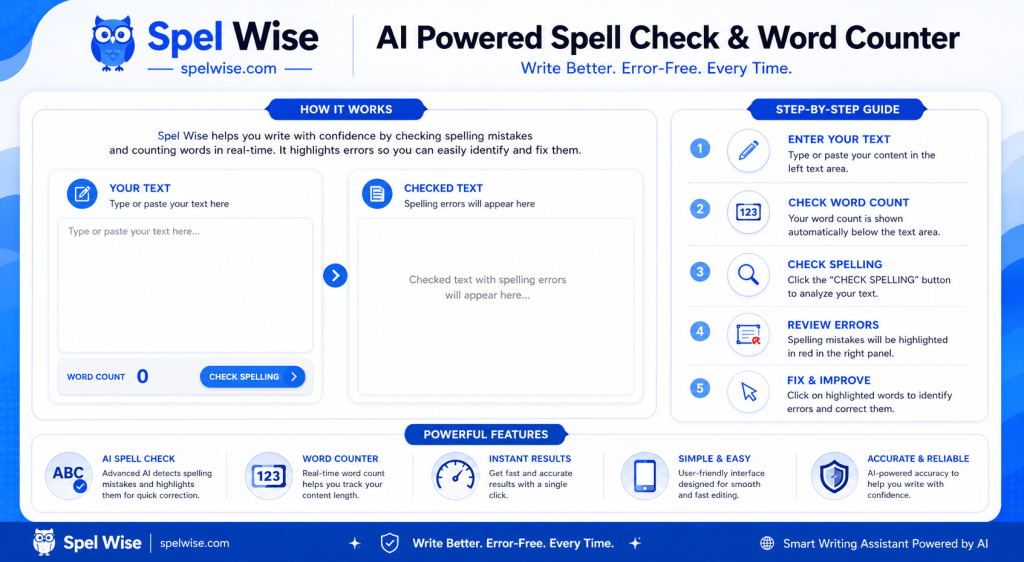
The Spel Wise spelling mistake checker is a free online tool that scans your text and highlights words that may contain spelling errors. It also displays the total word count of your content, making it useful for writers, students, bloggers, and professionals.
How to Use the Spelling Mistake Checker
Using the tool is simple and takes only a few seconds.
Visit the Spel Wise Spelling Mistake Checker page on:
https://spelwise.com
You will see two main sections:
- Your Article – where you paste or type your text
- Spell Check Result – where spelling errors are highlighted
In the Your Article box, enter the text you want to check.
You can:
- Paste content from a document
- Type directly into the editor
- Check short or long articles
The tool automatically counts your words while you type.
After entering your content, click the Check Spelling & Count Words button.
The tool will analyze your text and process the spelling check.
Any word that may contain a spelling mistake will be highlighted in the results section.
Highlighted words make it easy to:
- Locate spelling errors quickly
- Review problematic words
- Improve content accuracy
Compare the highlighted words with your original text and make the necessary corrections.
Once corrected, run the spelling check again to verify your content.
Understanding the Results
The tool provides two key outputs:
Word Count
The word counter displays the total number of words in your content.
Highlighted Spelling Errors
Potential spelling mistakes are highlighted in the result area, helping you find errors faster.
Best Practices for Accurate Results
To get the most accurate results:
- Use complete sentences whenever possible.
- Review highlighted words carefully.
- Recheck content after making corrections.
- Verify names, brands, and technical terms manually if needed.
Who Can Use the Spel Wise Spelling Mistake Checker?
This tool is useful for:
- Bloggers – Improve blog post quality
- Students – Check assignments and essays
- Content Writers – Ensure error-free content
- Copywriters – Polish marketing copy
- Website Owners – Maintain professional content
- Business Professionals – Review emails and documents
- Freelancers – Deliver high-quality work
Why Use Spel Wise?
Spel Wise offers a fast and simple way to review your content before publishing or sharing it. The tool helps you identify spelling mistakes and monitor word count from a single interface.
Frequently Asked Questions
Final Thoughts
The Spel Wise Spelling Mistake Checker is a fast and easy-to-use tool for identifying spelling errors and monitoring word count in your content. Simply paste or type your text, click the check button, review the highlighted words, and make the necessary corrections. Whether you're creating blog posts, website content, assignments, or professional documents, Spel Wise helps you review your writing quickly before publishing or sharing it.

Ultimate Guide to English Grammar: Master the Art of Effective

Grammar: The Invisible Architecture of Language Essay (Article)

Ultimate Guide to AI-Powered Productivity Apps in 2026

What is Grammar? Easy Definition and Examples for Beginners

The Colon in English Grammar: Definition, Rules, and Usage